
Set up a RadioBOSS encoder for SPCast
You need RadioBOSS, an SPCast broadcaster account and an audible output signal in the broadcasting software. These steps use Icecast and MP3. Interface labels can differ between software versions.
Configure the encoder and account
Open Options → Settings → Broadcast. Add an encoder with the plus button. In the wizard, select Icecast 2 and choose MP3 for the first audio test.
Copy host, port, username, password and mount point from SPCast product management. Use the intended broadcaster account details, not the public listening URL. Check letter case and the separate mount point field. TLS and port must match this particular account.
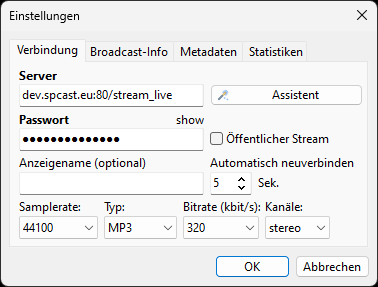
Existing SPCast documentation also describes a SHOUTcast connection. For that route, check the mount point field in particular. The Icecast route described here avoids changing multiple settings during initial troubleshooting.
Start broadcasting and listen
Select the intended audio source and check its level. Match bitrate and sample rate to the intended output. Start the encoder and check its connection status.
Open the public listening URL on a second device. Check music or speech, levels and track information. Use headphones to prevent monitoring audio from feeding back into the microphone. Then disconnect the encoder and check the return to AutoDJ. AutoDJ accepts MP3 only; additional live formats require separate compatibility checks.
Check listener statistics
Enable Get statistics from server if needed. Compare the reported connections with product management. Diagnose missing statistics separately from audio transmission.
Diagnose failures
For a rejected connection, check credentials and the mount point. For a timeout, compare host, port and TLS settings and check the local network. For a connected encoder without sound, check the audio source and levels. Change one setting at a time and repeat the listening test.
The setup tutorial checks the full environment. Include the version, time and error message in a support request. Remove passwords from images and public posts.